BetterPic and HeadshotPro land on most shortlists of AI headshot generators. They sit in a similar price range, both sell tiered packages you pay for before generation, and both can take up to two hours to deliver. Where they split is in how much they ask of you at the start and where the results come up short.
BetterPic asks for more upfront: eight photos and a questionnaire that covers clothing style, clothing color, makeup, and glasses. HeadshotPro asks for less on paper, with a one-photo minimum and three settings to choose, but runs your uploads through a strict approval check before it will generate anything.
Both approaches produced headshots in our testing, and both produced images that didn’t fully match the person in the source photos. That matters for a LinkedIn profile, a team page, or anywhere else people will later meet you in person. So we’ve also included Headshots.com, which takes a different route on speed, payment, and likeness.
Here’s a quick summary of who each platform may suit best:
- BetterPic: Best for users who want to specify details like clothing color, makeup, and glasses before generation, and who are comfortable with results that may alter how their body looks.
- HeadshotPro: Best for users who want the lowest entry price and a large batch of images, and who already have clean source photos that will pass a strict approval check.
- Headshots.com: Best for professionals and teams who want to see realistic results in about 30 seconds from a single photo, pay only for the images they keep, and adjust the details afterward.
Below, we cover each platform’s features, strengths, and shortcomings, then compare all three across the categories that matter most when choosing an AI headshot generator.
You can also see our full review of 16+ AI headshot tools here.
BetterPic Overview
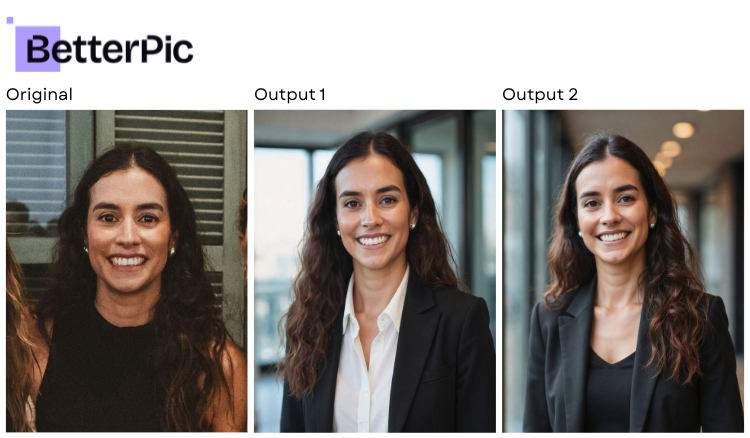
BetterPic is an AI headshot generator built around a detailed setup process. When we tested it, here’s how the process looked:
- You upload eight photos
- Answer a questionnaire about your appearance and the look you want
- Receive between 20 and 120 headshots in one to two hours, depending on the package
The questionnaire is the platform’s main selling point. It gives you more say over styling than most generators we tested. In our testing, though, that control didn’t carry through to the finished images, and the batch we received was smaller than the one we paid for.
Key Features
- Tiered pricing from $35 to $79 for individuals, with team pricing starting at $49 per person
- 8-photo upload requirement
- 1- to 2-hour turnaround
- 20 to 120 headshots delivered, depending on package
- Pre-generation questionnaire covering ethnicity, use case, gender, eye color, background, clothing style, clothing color, makeup, and glasses
Advantages
- Clothing style and clothing color are separate choices, and makeup and glasses each get their own setting. Few platforms we tested go that granular on styling before generation.
- The use case setting lets you tell the platform where the headshot will be used, which helps steer the overall look.
- Team pricing scales down with group size, so it can work for a department or company rollout.
- Photo sharpness and resolution were about average for the category, with no obvious softness in the images we received.
Shortcomings
- The AI model struggled with anything outside the face. Hands, necks, and chests often looked unnatural in our results, which rules out most wider crops.
- The subject came out noticeably thinner than in the source photos. The questionnaire has no body type setting, so there was no way to correct this before generating.
- Outputs showed little variation. Many images in the batch were close to interchangeable, which shrinks the number of real options you end up with.
- We paid for a package of 20 headshots and received 11.
- The 7-day money-back guarantee is subject to eligibility requirements, so a refund isn’t automatic.
HeadshotPro Overview
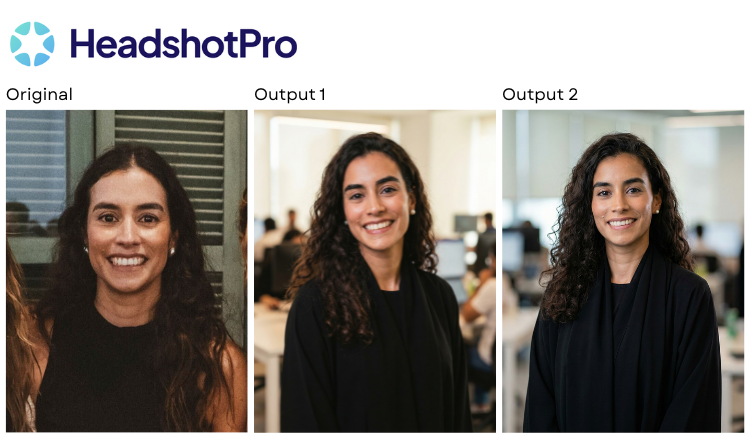
HeadshotPro is another AI headshot generator with one of the lower entry prices in the category. Packages run from $29 to $59 and deliver between 32 and 128 headshots in under two hours. It accepts as few as one photo, though it suggests three, and setup comes down to choosing a format, a background, and an outfit.
The platform is also known for a strict photo approval process that screens uploads before generation. In principle, that protects output quality. In our testing, it became the biggest obstacle to getting results at all.
Key Features
- Tiered pricing from $29 to $59 for individuals, with team pricing starting at $39 per person
- 1-photo minimum upload (3 suggested)
- Turnaround of under 2 hours
- 32 to 128 headshots delivered, depending on package
- Customization limited to format (portrait or landscape), background, and outfit
- Automated photo approval before generation
Advantages
- The $29 entry package is cheaper than BetterPic’s and delivers 32 headshots, so the cost per image is low if you want volume.
- The upload minimum is a single photo, which is a much lighter ask than the 8 to 15 photos many competitors require.
- The subject generally held a decent standard of realism. Skin, lighting on the face, and expressions looked natural in most outputs.
- A portrait or landscape format option is useful if you need a wider crop for a website banner or speaker page.
Shortcomings
- The photo approval process rejected all of the first 10 images we supplied. We had to switch the feature off to move forward, and the results that followed showed excessive facial variance.
- Some outputs looked like a different person. The resemblance was close enough to be plausible and far enough off that a colleague would notice.
- Backgrounds weren’t always believable. A few images even included studio lights in the frame.
- Image quality and detail were average, so the lower price doesn’t come with a sharper result.
- With only format, background, and outfit to choose from, there’s no way to steer expression, pose, or finer styling details.
Headshots.com Overview
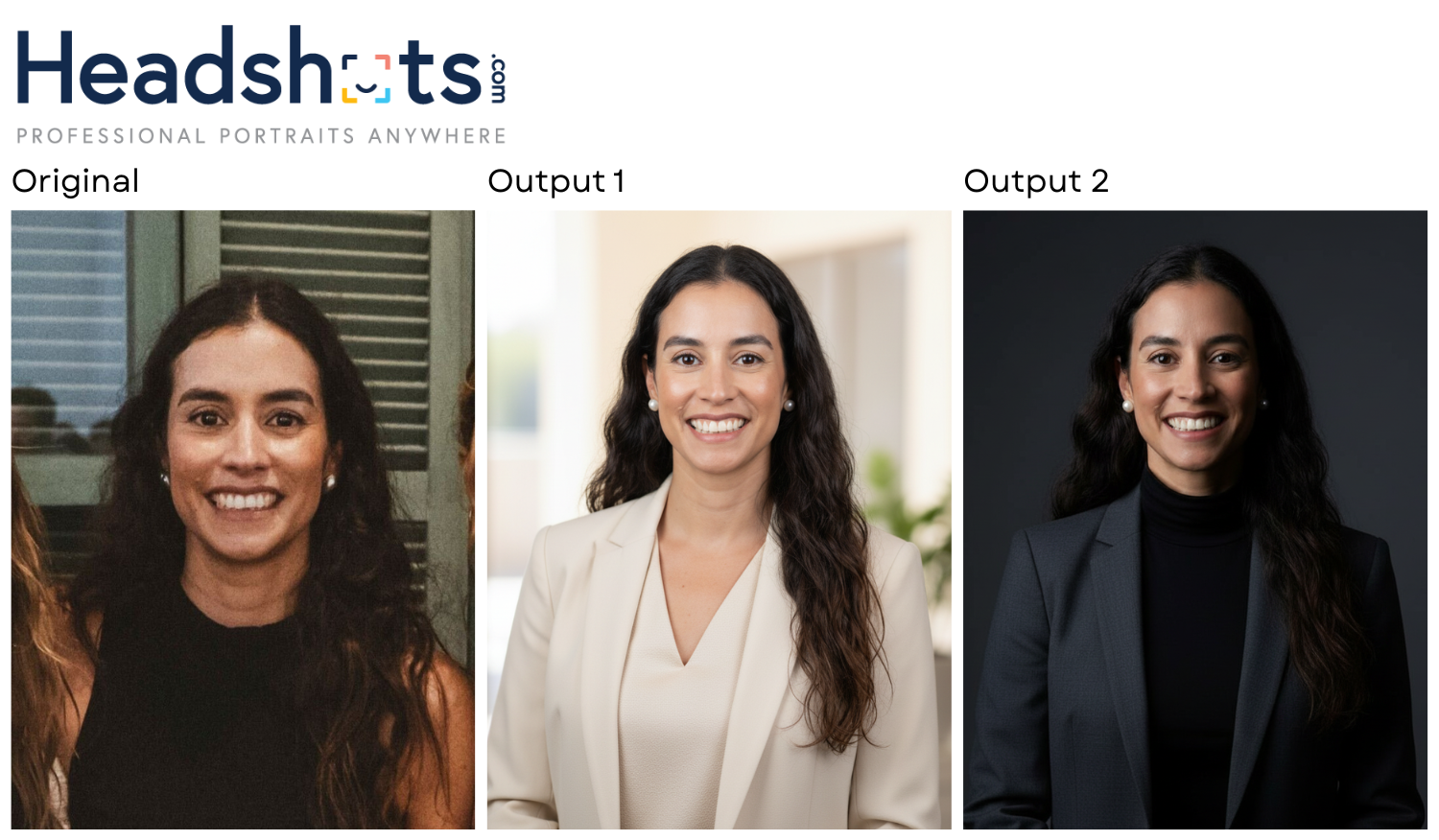
Headshots.com has been producing digital headshots for longer than AI generators have existed. The company was founded by a photographer with more than 17 years of headshot experience, and its virtual headshot service has been used by over 4,000 brands, including Toyota, JPMorgan, Voya, and T-Mobile. Its AI headshot product applies that background to one goal: an image that still looks like you.
The process is also set up differently from BetterPic and HeadshotPro. You upload a single photo, see 30 headshots about 30 seconds later, and pay $15 for each image you decide to keep.
Here’s what that changes in practice:
1. You know in half a minute whether it worked
With BetterPic and HeadshotPro, the wait between uploading and seeing results can run up to two hours. If the batch misses, you’ve lost most of an afternoon before you can even try again. Headshots.com returns results in roughly 30 seconds, so a miss costs you almost nothing and a second attempt is immediate.
2. Payment comes after the results
Both competitors charge $29 to $79 before generating a single image. Headshots.com generates the headshots first and charges $15 per image only for the ones you choose. If you need one headshot for LinkedIn, you pay for one. You never end up holding a paid package that came back short or unusable.
Buyers who want dozens of images will find a lower per-image cost in a package. Most people use one or two headshots, though, and at that count the pay-per-image model costs about the same as or less than either competitor’s entry tier.
3. Likeness is the main priority
The most common failure we saw across AI headshot generators was drift, where the output is a polished photo of someone slightly different. BetterPic slimmed the subject down. HeadshotPro sometimes changed the face enough to read as another person. In our testing, Headshots.com kept unique facial features intact, held natural expressions, and avoided the over-processed look that marks an image as AI-generated.
4. A near miss can be fixed
On most platforms, an image that’s almost right stays almost right. The Headshots.com Refinement Studio lets you change outfit color, accessories, posture and position, expression, background, lighting, and color after generation. That turns a close result into a usable one without starting a new batch or re-entering a questionnaire.
5. One photo is all you need
BetterPic needs eight photos before it will start. HeadshotPro accepts one but recommends three, and its approval check turned away our first 10 uploads. Headshots.com is designed to work from a single photo, which removes the step of digging through your camera roll for a matching set of well-lit shots.
Comparing BetterPic, HeadshotPro, and Headshots.com Head-to-Head
Here’s how the three platforms compare across each category.
Pricing Model
| BetterPic | $35-$79 individual, $49+/person for teams, paid before you see results |
| HeadshotPro | $29–$59 individual, $39+/person for teams, paid before you see results |
| Headshots.com | $15 per image, no upfront cost. Generate first, pay only for what you keep. |
Photos Required to Upload
| BetterPic | 8 |
| HeadshotPro | 1 minimum (3 suggested) |
| Headshots.com | 1 |
Turnaround Time
| BetterPic | 1-2 hours |
| HeadshotPro | Under 2 hours |
| Headshots.com | ~30 seconds |
Number of Headshots Delivered
| BetterPic | 20–120 advertised (we received 11 from a 20-image package) |
| HeadshotPro | 32–128 |
| Headshots.com | 30 |
Image Quality and Realism
| BetterPic | Average sharpness and resolution; unnatural hands, necks, and chests; subject rendered thinner than source photos; little variation across outputs |
| HeadshotPro | Average quality and detail; subject generally realistic but sometimes resembles a different person; backgrounds not always believable |
| Headshots.com | Very high; hyper-realistic results that preserve unique facial features, natural expressions, and actual body proportions |
Customization Options
| BetterPic | Pre-generation: ethnicity, use case, gender, eye color, background, clothing style, clothing color, makeup, glasses |
| HeadshotPro | Pre-generation: format (portrait/landscape), background, outfit |
| Headshots.com | Styles (background + outfit) at generation, then the Refinement Studio: outfit color, accessories, posture/position, expression, background, lighting, color |
Money-Back Guarantee
| BetterPic | Yes, 7-day window, subject to eligibility |
| HeadshotPro | Yes |
| Headshots.com | Yes, and you only pay for images you’ve already seen and chosen |
Best For
| BetterPic | Users who want detailed styling choices before generation and can accept changes to how their body appears |
| HeadshotPro | Budget-focused users who want a large batch and have source photos that will pass a strict approval check |
| Headshots.com | Professionals and teams who want fast, realistic results from one photo and prefer to pay only for images they’ll use |
Which AI Headshot Generator Should You Choose?
Choose BetterPic if specifying your look in advance matters most to you. Its questionnaire covers clothing style, clothing color, makeup, and glasses, which is more than most platforms offer before generation. Go in knowing the tradeoffs we saw: a thinner-looking subject with no setting to correct it, weak rendering of hands and upper body, and a delivered batch of 11 images from a package of 20.
Choose HeadshotPro if price and volume are your main concerns and your source photos are clean, well lit, and recent. The $29 entry package delivers 32 images, and the subject usually looks realistic. Expect a strict approval check, limited customization, and some outputs that don’t quite look like you. If you have to turn the approval check off, as we did, facial variance gets worse.
Choose Headshots.com if you want a headshot that looks like you without committing money or hours upfront. One photo gets you 30 results in about 30 seconds, you pay $15 only for the images you keep, and the Refinement Studio lets you adjust expression, outfit color, background, and lighting afterward. It produced the most realistic results of the three in our testing.
A headshot is usually the first thing a client, recruiter, or new colleague sees of you, and it should match the person who shows up to the meeting. Try Headshots.com’s AI headshots and judge the results for yourself before you pay for anything.