Aragon AI and HeadshotPro are both AI headshot generators that attract professionals looking for a quick alternative to traditional photography. On the surface they seem to occupy similar territory, but the way they get you from upload to finished headshot is quite different.
Aragon AI gives you a wide set of controls before generation (industry type, attire, background, body type) and delivers a large batch of images in under an hour. HeadshotPro takes a more minimal approach to customization but requires as few as one photo to get started, which is unusual in this category. The tradeoff is a photo approval process so strict it can become its own obstacle.
What matters in the end is whether the headshot you receive actually looks like you and holds up in the places professionals use it: LinkedIn, company directories, speaking bios, personal branding. Both platforms miss that standard in different ways. Headshots.com, built around realism and post-generation control, offers a third option.
Here’s a quick summary of who each platform may be best suited for:
- Aragon AI: Best for users who want detailed pre-generation customization and a fast turnaround, and who can tolerate some variance in output quality across a large batch.
- HeadshotPro: Best for users who want a low photo upload requirement and high volume of outputs, and are willing to navigate a restrictive approval process and accept inconsistent backgrounds.
- Headshots.com: Best for professionals and teams who need headshots that genuinely look like them, delivered in seconds rather than hours, with pay-per-image pricing and a full post-generation refinement studio.
Let’s dig into each platform’s features, test results, and limitations, then compare them head-to-head on the categories that matter most when evaluating different AI headshot generators. You can also see our full review of 16+ AI headshot tools here.
Aragon AI Overview
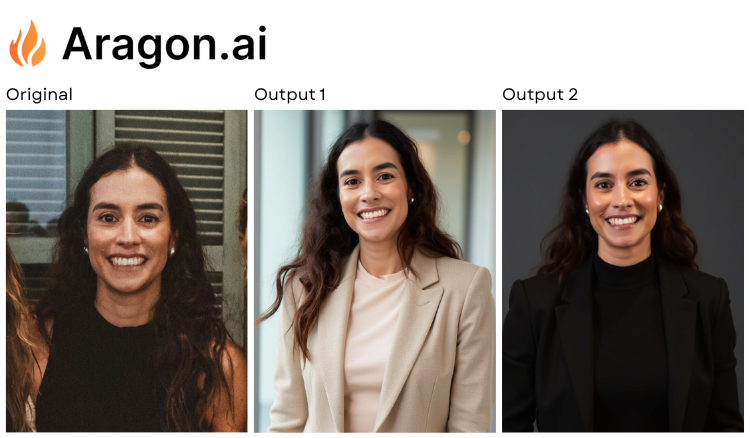
Aragon AI positions itself as a customization-forward headshot generator. Before anything is generated, you fill out a detailed set of preferences, including industry type (Professional, Healthcare, Realtor, Lawyer, and others), attire, background, hair details, ethnicity, and body type. In theory, this gives the AI a stronger starting point than platforms that just ask you to pick a preset.
That level of input is one of Aragon’s clear strengths. The upload requirement is also lower than most competitors at just six photos, and the image approval process wasn’t overly picky in our experience. You can have results in as little as 15 minutes.
The output itself was less predictable. Our batch included images that ranged from clean and sharp to noticeably lower quality, sometimes within the same set. The facial likeness was generally solid, but artifacts crept into several images, particularly when hands appeared in the frame.
Key Features
- Tiered pricing from $35 to $75 for individuals, with team pricing starting at $45 per person and scaling discounts for larger groups
- 15- to 45-minute turnaround depending on the package
- 6-photo minimum upload (up to 10 accepted)
- 40 to 100 headshots delivered depending on plan
- Pre-generation customization: type, gender, age, hair color, hair length, hair type, ethnicity, body type, attire, and background
Advantages
- The pre-generation controls are among the most detailed in this category. Being able to set industry type and attire before the AI runs gives you more directional influence than a simple “pick a look” system.
- Six uploaded photos is a lower starting bar than the 8, 10, or 15 that many competitors require. Getting past the upload step takes less effort.
- The photo approval process was reasonable. Unlike some platforms that rejected nearly everything we tried, Aragon accepted our submissions without excessive friction.
- Team pricing with volume discounts makes it a workable option for departments and organizations needing batch headshots.
Shortcomings
- Quality was inconsistent across the delivered batch. Some images were clean, sharp, and high-resolution. Others in the same set dropped noticeably in quality, with artifacts that made them unusable, especially in photos where the subject’s hands were visible.
- The pricing, $35 to $75, is mid-to-premium range. When you factor in the time spent sorting through variable-quality outputs to find the usable ones, the effective cost per good image goes up.
- Facial features were preserved well in most outputs, but some drifted far enough from the source photos that they wouldn’t pass as a convincing likeness.
- The 7-day money-back guarantee has criteria attached, so it’s not an unconditional refund.
HeadshotPro Overview
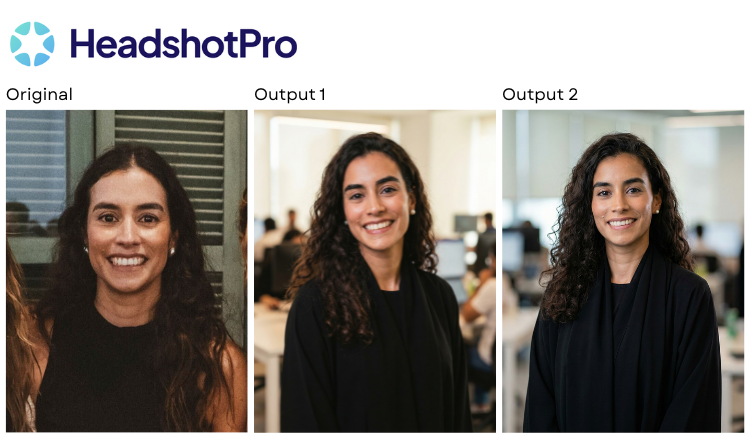
HeadshotPro takes a leaner approach to customization than Aragon but has one distinct advantage. It only requires a single photo to get started, with three suggested. That’s a much lower barrier than the 6, 8, 10, or even 15 photos most generators ask for. The platform offers tiered pricing from $29 to $59, delivers 32 to 128 headshots depending on the plan, and has a turnaround of under two hours.
In practice, though, the experience was more complicated than the specs suggest. HeadshotPro had one of the strictest photo approval processes we encountered across all 16 generators we tested. It rejected every one of the first 10 images we submitted, and we ultimately had to disable the approval feature entirely to move forward. That workaround came with a cost. Turning off the filter led to excessive facial variance in the output, with some results looking like a different person altogether.
The backgrounds were another consistent weakness. Across our batch, they often looked artificial and generic, and in a few cases inexplicably included visible photo lights, as if the AI was trying to simulate a studio environment and overshot it.
Key Features
- Tiered pricing from $29 to $59 for individuals, with team pricing starting at $39 per person
- Under 2-hour turnaround
- 1-photo minimum (3 suggested)
- 32 to 128 headshots delivered depending on plan
- Customization options: format (portrait/landscape), background, outfit
Advantages
- The 1-photo minimum is one of the lowest upload requirements among the generators we tested. For users who don’t have multiple professional-quality photos on hand, this removes a common barrier.
- At $29 for the entry-level package, HeadshotPro is one of the more affordable options in the category, with high volume for the price.
- A money-back guarantee is offered, which adds some risk reduction for first-time users.
- The volume of delivered headshots (up to 128 at the highest tier) gives you a large pool to pick from.
Shortcomings
- The photo approval process was the most restrictive we tested. Rejecting all 10 of our initial uploads suggests the standards are calibrated in a way that’s likely to frustrate real users, especially anyone on a deadline or working with a team.
- Disabling the approval filter to proceed introduced significant facial variance. Multiple outputs looked like a different person rather than a consistent likeness of the subject. That’s a fundamental problem for a headshot.
- Backgrounds frequently looked unrealistic. Rather than clean, professional backdrops, we saw generic environments and at times even visible studio lighting equipment baked into the image.
- Customization is limited to format, background, and outfit. There’s no control over expression, lighting, posture, or any post-generation refinement.
Headshots.com Overview
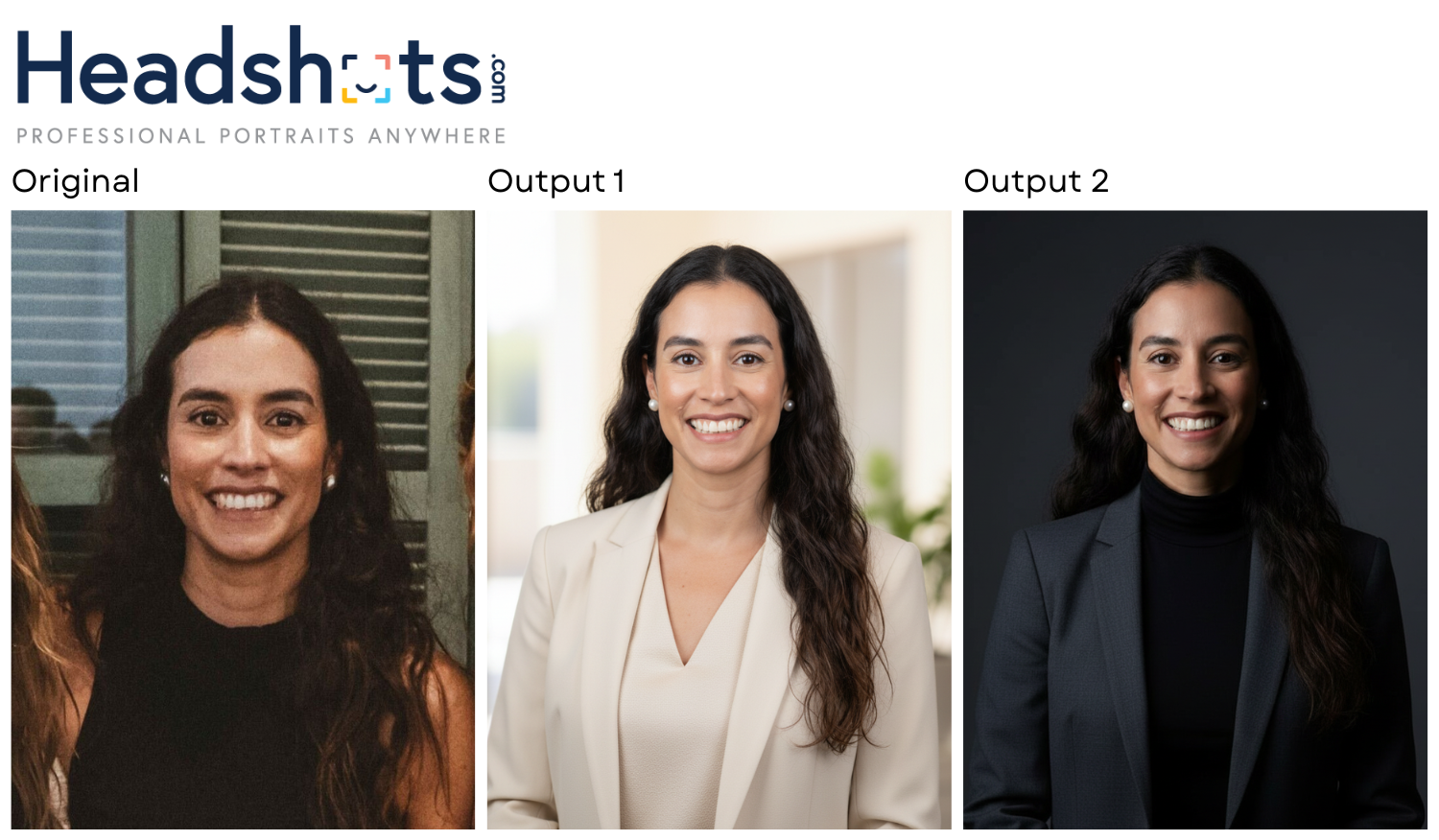
Headshots.com came out of 17 years of professional headshot photography. The founder’s background behind the camera shaped how the platform works. Every design decision points toward producing images that actually look like the person in front of the lens, or in this case, the person uploading a photo.
The workflow is deliberately simple. Upload one photo, receive your headshots in about 30 seconds, and browse the results before spending anything. There’s no subscription, no prepaid package, and no pile of throwaway images to dig through. At $15 per image, you pay only for the shots you decide to keep. That model flips the economics of most competitors, where you commit $29 to $79 upfront and hope the output justifies it.
Professionals from more than 4,000 brands, including Toyota, JPMorgan, Voya, and T-Mobile among them, have used the platform, and the results hold up at that scale. Here’s what sets it apart:
1. Upload one photo. Get results in 30 seconds.
Most generators need 6 to 15 photos and turnaround times measured in hours. Headshots.com needs one image and delivers results in roughly half a minute. That speed collapses the typical generate-and-wait cycle into something closer to real-time feedback. You see the quality immediately and decide whether to continue.
2. No upfront payment — pay per image
Every other platform in our testing charged before you could see results. Headshots.com doesn’t. You generate for free, review the output, and pay $15 per image only for the ones worth keeping. If none of them work, you haven’t spent a dollar.
3. Hyper-realistic output that actually looks like you
Across every platform we tested, Headshots.com produced the results closest to what the subject actually looks like. The images preserved distinct facial features, maintained natural expressions, and avoided the over-smoothed, uncanny-valley quality that makes many AI headshots feel off. These look like they came from a real photo session.
4. Post-generation Refinement Studio
Most platforms lock you into whatever the AI generates on the first pass. Headshots.com offers a Refinement Studio with granular controls. You can adjust outfit color, add or remove accessories, change posture and position, modify expression, swap backgrounds, and tune lighting and color. You end up with a headshot tailored to your specific use case (LinkedIn, company bio, conference speaker page) rather than a generic output you have to accept as-is.
5. Built for professionals and teams at scale
Headshots.com’s client roster includes Fortune 500 companies and thousands of brands. The platform handles both individual professionals and large teams, delivering consistent quality across volume for enterprise use.
Comparing Aragon AI, HeadshotPro, and Headshots.com Head-to-Head
All three platforms promise professional AI headshots, but the experience and output quality vary widely across several key categories.
Pricing Model
| Aragon AI | $35–$75 individual, $45+/person for teams, pay before you see results |
| HeadshotPro | $29–$59 individual, $39+/person for teams, pay before you see results |
| Headshots.com | $15 per image, with no upfront cost. Generate images first, pay only for what you want to keep. |
Photos Required to Upload
| Aragon AI | 6 minimum (up to 10) |
| HeadshotPro | 1 minimum (3 suggested) |
| Headshots.com | 1 |
Turnaround Time
| Aragon AI | 15–45 minutes |
| HeadshotPro | Under 2 hours |
| Headshots.com | ~30 seconds |
Number of Headshots Delivered
| Aragon AI | 40–100 |
| HeadshotPro | 32–128 |
| Headshots.com | 30 |
Image Quality and Realism
| Aragon AI | Good but variable; some images are sharp and well-rendered, others have artifacts, especially around hands; facial features generally preserved |
| HeadshotPro | Average detail; decent subjects but backgrounds often look unrealistic, with photo lights sometimes visible; facial variance issues when approval filter is disabled, sometimes looking like a different person |
| Headshots.com | Very high; hyper-realistic results that preserve unique facial features, natural expressions, and avoid the commonly seen over-processed AI look |
Customization Options
| Aragon AI | Pre-generation: type (Professional, Healthcare, Realtor, etc.), gender, age, hair details, ethnicity, body type, attire, background |
| HeadshotPro | Pre-generation: format (portrait/landscape), background, outfit |
| Headshots.com | Post-generation Refinement Studio: outfit color, accessories, posture/position, expression, background, lighting, color |
Money-Back Guarantee
| Aragon AI | Yes, with criteria (7-day window) |
| HeadshotPro | Yes |
| Headshots.com | Yes, plus the pay-per-photo model means you’re never paying for images you don’t want in the first place |
Best For
| Aragon AI | Users who want detailed pre-generation customization, a relatively fast turnaround, and are willing to sort through quality variance in a large batch |
| HeadshotPro | Users who want a low upload requirement and high volume of images at a lower price point, and can tolerate unrealistic backgrounds and a strict approval process |
| Headshots.com | Professionals and teams who prioritize realism, want full post-generation control, and prefer paying only for images they’ll actually use |
Which AI Headshot Generator Should You Choose?
Choose Aragon AI if pre-generation control is important to you. The ability to specify industry type, attire, body type, and background before anything is generated gives you more directional input than most competitors offer, and the six-photo upload minimum keeps the process accessible. Aragon also works reasonably well for teams thanks to its scaling discounts. Output consistency is the main caveat. Expect a meaningful portion of your batch to have quality issues or artifacts, so plan for sorting time. At $35 to $75 prepaid, you’re committing before you know whether the results will be worth it.
Choose HeadshotPro if you’re drawn to the low photo requirement and affordable entry price. Starting at $29 with just one photo needed is appealing, especially if you don’t have a library of professional-quality images to upload. The volume is high too, with up to 128 headshots. But the photo approval process is likely to slow you down, and the workaround (disabling the filter) introduces facial variance that undermines the whole point of a headshot. The backgrounds were a recurring weak spot in our testing as well. If you’re not sensitive about exact likeness or backdrop quality, it can work. If you are, it’s a risk.
Choose Headshots.com if what you care about most is a headshot that genuinely looks like you. A single photo, 30-second turnaround, and pay-per-image pricing mean you see results almost immediately and never pay for images you don’t want. The Refinement Studio gives you post-generation control that neither Aragon nor HeadshotPro can match. You can adjust outfit, expression, posture, background, and lighting after the fact rather than hoping the AI gets it right the first time. The output quality was the strongest we found across all the platforms we tested: realistic, natural, and professional without the over-processed AI look.
Whether you need a sharp LinkedIn photo, consistent headshots across a team, or a professional image for a company page, the goal is always the same. It should look like the real you. Try Headshots.com’s AI headshots to see the difference for yourself.