InstaHeadshots and BetterPic are two AI headshot generators that promise professional results without a traditional photoshoot. Both ask you to upload a batch of photos, wait, and receive a set of finished headshots, but they differ in how much you upload, how long you wait, and what you actually get back.
InstaHeadshots keeps things simple with one price, one package, and fast turnaround. BetterPic offers tiered pricing and more pre-generation customization, but in our testing it struggled with realism in ways that are hard to overlook.
Those differences are important when you’re choosing a headshot for your LinkedIn, company page, or professional portfolio, where the image needs to actually look like you, not just look professional. Neither platform consistently nails that balance. We’ll also look at Headshots.com, which was built around realism and flexibility from the start.
Here’s a quick summary of who each platform may be best suited for:
- InstaHeadshots: Best for users who want a large batch of headshots quickly at a flat price and don’t need much control over backgrounds or outfits.
- BetterPic: Best for users who want tiered package options and pre-generation customization, and who can tolerate inconsistent output and limited variety.
- Headshots.com: Best for professionals and teams who need hyper-realistic headshots that actually look like them, with a pay-per-photo model that eliminates waste, a single-photo upload, and a full refinement studio for fine-tuning every detail.
With that, let’s walk through each platform’s key features, results, and shortcomings, then compare them head-to-head across the categories that matter most when evaluating an AI headshot generator.
InstaHeadshots Overview
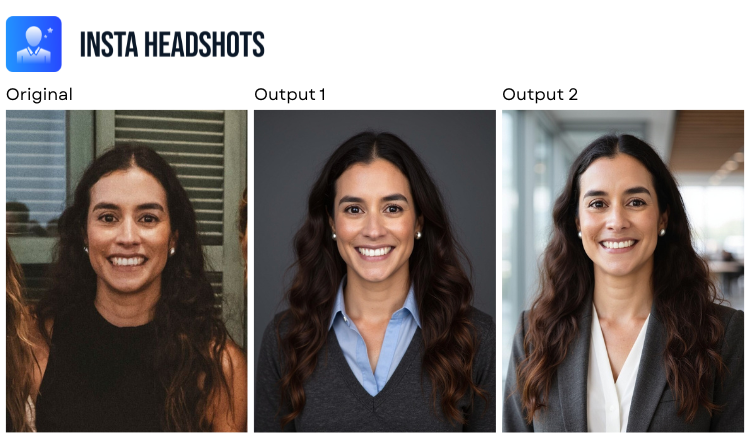
InstaHeadshots offers a no-frills experience. There’s one package, one price, and one decision to make once your photos are in. You pick a “look.”
From there you wait roughly 15 minutes and get back 50 headshots. The whole appeal is that there’s nothing to configure and nothing to second-guess.
For people who just want headshots done and don’t want to wade through a questionnaire, that simplicity is the draw. But stripping out the settings also strips out your ability to steer the result, and in our testing the output had a recurring flaw that’s tough to forgive in a professional photo.
Key Features
- Single-tier pricing at $59 for 50 headshots
- 15-minute turnaround from upload to delivery
- “Looks” system that bundles background and outfit together as preset combinations
- 10-photo upload requirement
Advantages
- At around 15 minutes, the turnaround is fast, which counts for a lot when you’re up against a deadline.
- Fifty images for a flat fee gives you plenty to dig through, even if only a few make the cut.
- There’s no learning curve. Upload, choose a look, wait. That’s the entire flow.
Shortcomings
- The eyes were the consistent weak spot. Across multiple outputs we saw inaccurate color, slight misalignment, or a stare more intense than anything in the source photos. Since eyes are the first thing anyone notices in a headshot, that’s not a minor flaw.
- Your only real lever is the preset “look,” which locks background and outfit together. There’s no way to set your background, outfit style, outfit color, or expression on their own.
- The flat $59 buys you a lot of images but not much else, and there’s no cheaper tier if you only need one or two usable shots.
- A money-back guarantee exists, but the 3-day window and strict criteria make it more of a formality than a real safety net.
BetterPic Overview
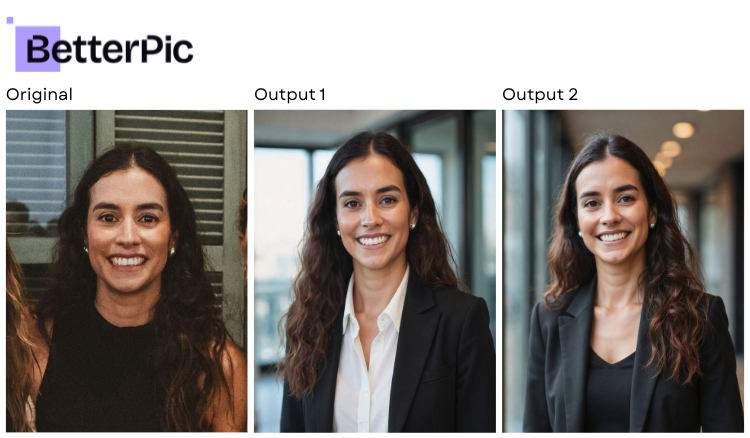
The platform offers more control than a flat-package service like InstaHeadshots, but our testing surfaced consistent problems with how the model handled the human subject, particularly outside the face. The customization options are there, but they didn’t translate into reliably usable results.
In practice, our testing surfaced consistent problems with how the model handled the human subject, particularly outside the face. The customization options are there, but they didn’t translate into reliably usable results.
Key Features
- Tiered pricing from $39 to $79 for individuals, with team pricing starting at $49 per person
- 1- to 2-hour turnaround
- 8-photo upload requirement
- 20 to 120 headshots delivered depending on plan
- Pre-generation customization including ethnicity, use case, gender, eye color, background, clothing style, clothing color, makeup, and glasses
Advantages
- The pre-generation customization is reasonably detailed. Being able to set clothing style, clothing color, and use case before generation gives you some influence over the final direction.
- Tiered pricing means you can scale up to a larger batch if you want more options, and team pricing is available for group use.
- The platform offers a 7-day money-back guarantee, though it’s subject to eligibility conditions.
Shortcomings
- While sharpness and resolution landed around average, the AI model struggled with natural human features outside the face. Hands, necks, and chests were frequent trouble spots in our outputs.
- BetterPic tended to make the subject noticeably thinner than the source photos, with no option to correct this in the pre-generation questionnaire. If the output doesn’t match your build, the headshot stops being useful.
- There was little variation across the delivered images, so a larger package didn’t necessarily mean more meaningfully different options.
- In our testing, a package advertised as 20 images delivered only 11. Combined with average pricing and turnaround, the gap between what’s promised and what arrives was one of the bigger disappointments we ran into.
Headshots.com Overview
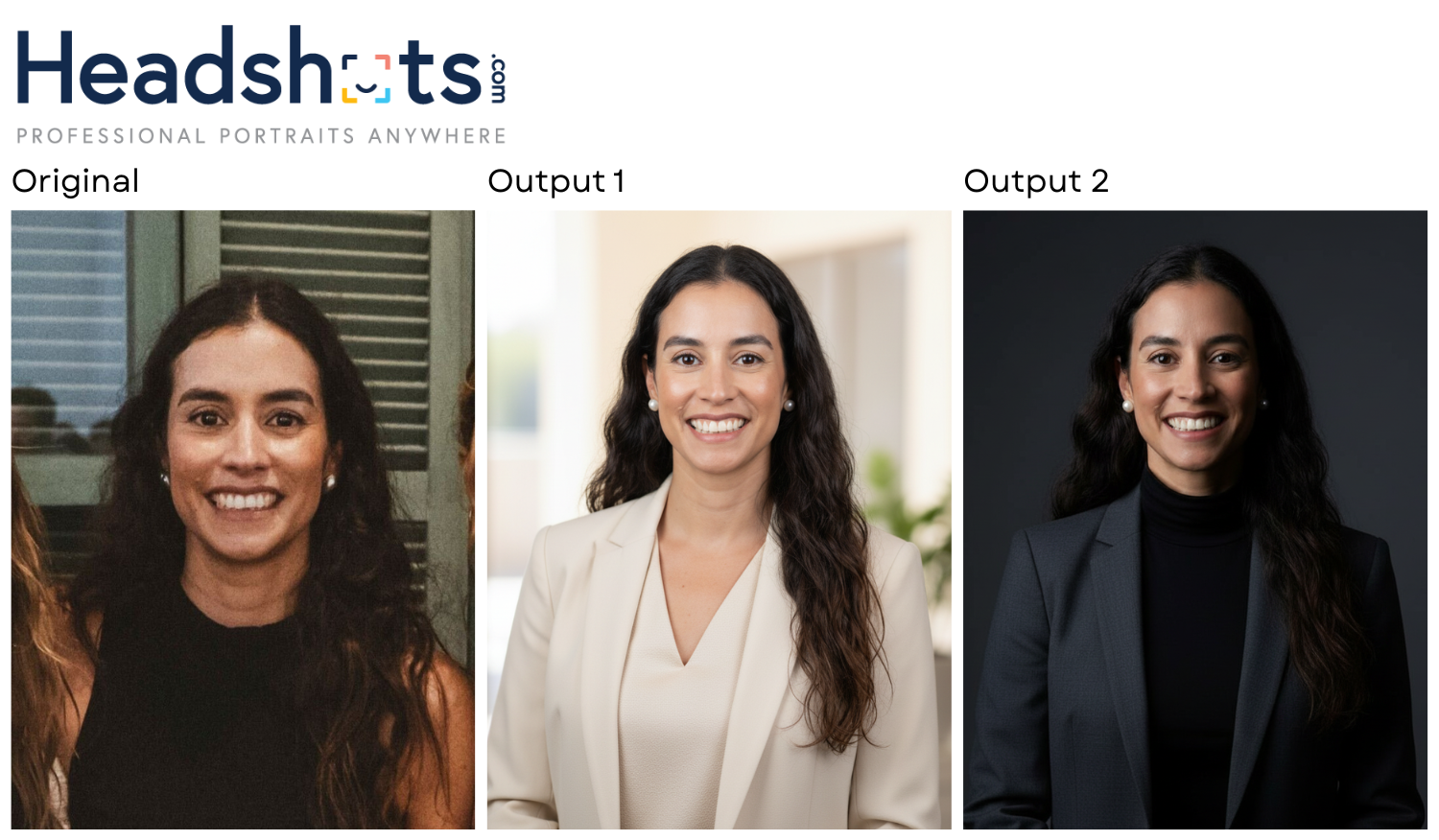 Headshots.com is the original digital headshot company, started by a photographer with more than 17 years behind the camera shooting professional headshots. That background shapes the whole product. Above all, the AI is built to keep you recognizably you in the final image.
The typical AI headshot flow is upload a pile of photos, wait, and cross your fingers. Headshots.com skips most of that. A single photo is enough, results come back in about 30 seconds, and you only open your wallet for the shots you decide to keep. Nothing is charged up front, there’s no subscription, and you’re not stuck combing through hundreds of throwaway images to salvage a few.
More than 4,000 brands have used the platform, Toyota, JPMorgan, Voya, and T-Mobile among them, and its reputation rests on delivering consistent, true-to-life results at scale. A few things set it apart:
1. One photo. Thirty seconds. Real results.
Where most generators want 6 to 15 photos and make you wait hours, Headshots.com asks for one image and turns it around in roughly 30 seconds.
Instead of committing to a package and hoping, you see the quality almost immediately and decide from there.
2. Pay only for what you want
Headshots.com was the only platform in our testing with no upfront charge. You generate for free, look through what comes back, and pay $15 an image only for the ones you’ll actually use. That sidesteps the sunk-cost trap baked into competitors charging $39 to $79 before a single image appears, and it spares you from paying for a batch that lands fewer keepers than promised.
3. Hyper-realistic output that preserves who you are
Of everything we tested, Headshots.com gave us the most lifelike results. Distinctive facial features stayed intact, expressions looked natural, and the images dodged the over-processed sheen that makes a headshot read as fake. It also left the subject’s body alone and handled hands, neck, and chest cleanly, areas where some competitors fell apart. The result looks shot, not generated.
4. A Refinement Studio with near-endless customization
Once your images are generated, the Refinement Studio opens up adjustments to outfit color, accessories, posture and position, expression, background, lighting, and color. Because this control comes after generation, you’re never boxed in by the AI’s first attempt. You can keep tuning until the shot fits the use, be it LinkedIn, a company directory, a speaking bio, or a personal brand.
5. Trusted by professionals and teams
A client roster spanning Fortune 500 companies and 4,000-plus brands is a track record few AI headshot startups can claim. The platform scales from a single professional to an entire team, so it works whether you need one headshot or a hundred that look like they came from the same shoot.
Comparing InstaHeadshots, BetterPic, and Headshots.com Head-to-Head
All three platforms promise professional AI headshots, but the experience and output vary widely. The comparisons below cover the categories that matter most when choosing a generator.
Pricing Model
| InstaHeadshots | $59 flat fee, single package, pay before you see results |
| BetterPic | $39–$79 individual, $49+/person for teams, pay before you see results |
| Headshots.com | $15 per image, no upfront cost. Generate first, pay only for what you keep. |
Photos Required to Upload
| InstaHeadshots | 10 |
| BetterPic | 8 |
| Headshots.com | 1 |
Turnaround Time
| InstaHeadshots | ~15 minutes |
| BetterPic | 1-2 hours |
| Headshots.com | ~30 seconds |
Number of Headshots Delivered
| InstaHeadshots | 50 |
| BetterPic | 20–120 (a 20-pack delivered only 11 in our testing) |
| Headshots.com | 30 |
Image Quality and Realism
| InstaHeadshots | Average quality with recurring eye issues. Lighting and backgrounds are decent but subject accuracy is inconsistent. |
| BetterPic | Average sharpness, but the model struggled with hands, neck, and chest and made subjects noticeably thinner than the source photos, with little variation across outputs. |
| Headshots.com | Very high. Hyper-realistic results that preserve unique facial features, natural expressions, and avoid the over-processed AI look. |
Customization Options
| InstaHeadshots | Preset “looks” (bundled background + outfit) with no independent control |
| BetterPic | Pre-generation: ethnicity, use case, gender, eye color, background, clothing style, clothing color, makeup, glasses |
| Headshots.com | Post-generation Refinement Studio: outfit color, accessories, posture/position, expression, background, lighting, color |
Money-Back Guarantee
| InstaHeadshots | Yes, with strict criteria (3-day window) |
| BetterPic | Yes, with eligibility conditions (7-day window) |
| Headshots.com | Yes, and the pay-per-photo model means you’re never paying for images you don’t want in the first place |
Best For
| InstaHeadshots | People who want a large batch quickly without needing customization, and don’t mind paying upfront |
| BetterPic | People who want tiered packages and pre-generation customization and can tolerate inconsistent realism and limited variety |
| Headshots.com | Professionals and teams who prioritize realism, want full post-generation control, and prefer paying only for images they’ll actually use |
Which AI Headshot Generator Should You Choose?
Choose InstaHeadshots if you want a simple, no-decisions process with a fast turnaround and don’t need much control over the output. It works best when you need volume quickly and are comfortable sorting through 50 images to find a few that work, with the understanding that eye quality issues may limit how many are truly usable. Just keep in mind that $59 buys limited customization and inconsistent results.
Choose BetterPic if you want tiered package options and a detailed pre-generation questionnaire, and you’re mainly after a polished general impression rather than a faithful likeness. The customization controls are there, but in our testing the output was held back by problems with hands, neck, and chest, a tendency to slim the subject down, and a package that delivered fewer images than advertised. Factor that in before paying upfront.
Choose Headshots.com if your priority is a headshot that truly looks like you. The single-photo upload, 30-second turnaround, and pay-per-image model eliminate most of the friction and financial risk that come with other platforms. The Refinement Studio gives you granular control after generation, so you’re not locked into whatever the AI produces on the first pass. The output quality was the strongest of any platform we tested, with results that looked realistic, natural, and professional, and that preserved the subject as they actually appear.
Whether you’re updating your LinkedIn, onboarding with a new company, or refreshing headshots across a team, the goal is the same. You want a professional image that looks like the real you. Try Headshots.com’s AI headshots and judge the results for yourself.
Buying for a team? Start a free team trial and see your team’s results before you pay.