InstaHeadshots and HeadshotPro are two AI headshot generators that show up regularly in side-by-side comparisons. Both aim to replace the traditional photoshoot with faster, cheaper results, but they land in noticeably different places when it comes to pricing, the upload experience, and what you can expect from the finished product.
InstaHeadshots goes all-in on simplicity: one price, one package, quick delivery. HeadshotPro offers tiered plans and a wider spread of output volumes, but introduces a photo approval step that can create real friction before you even get to generation.
For professionals choosing a headshot for LinkedIn, a company page, or a portfolio, the image needs to do more than look polished — it needs to look like you. Neither of these platforms hit that mark reliably. We’ll also cover Headshots.com, a platform built from the start around realism and post-generation control.
Here’s a quick look at who each platform fits best before we get into the full breakdown:
- InstaHeadshots: Best for users who want a large batch of headshots fast at a flat price and aren’t concerned about granular customization.
- HeadshotPro: Best for users looking for a lower starting price and higher output volumes, provided they can work through an unusually strict upload process.
- Headshots.com: Best for professionals and teams who want headshots that genuinely look like them, with a pay-per-photo model, a single-photo upload, and a full refinement studio for post-generation adjustments.
Here’s how each platform performs across the categories that matter most, followed by a head-to-head comparison.
InstaHeadshots Overview
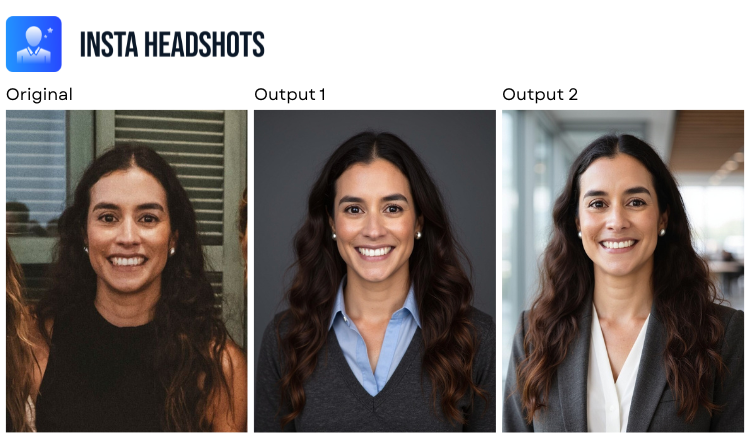
InstaHeadshots strips the AI headshot process down to the basics. There’s one package at one price: $59 for 50 headshots, delivered in roughly 15 minutes. You upload 10 photos, select from a set of preset “looks,” and the platform handles the rest.
That simplicity is the main selling point. There’s no tier to choose, no lengthy questionnaire, and no decisions beyond which look you want. But less complexity also means less control, and the output quality in our testing raised enough concerns to give us pause.
Key Features
- Flat $59 pricing with no tiered options
- ~15-minute delivery after upload
- Preset “looks” that pair a background with an outfit as a single selection
- Requires 10 uploaded photos
Advantages
- Speed is InstaHeadshots’ strongest asset. A 15-minute turnaround puts it among the faster options we evaluated, which is useful when you’re up against a tight deadline.
- You get 50 headshots for a single price, so there’s a reasonable volume to work with even if only a fraction end up being usable.
- The workflow is simple. There are no multi-step forms or confusing plan structures to navigate before you can generate.
Shortcomings
- Eye quality was a consistent problem. Several outputs showed unnatural eye coloring, slight misalignment, or an intensity that didn’t reflect the original photos. In a headshot, where eye contact is the focal point, these issues stand out immediately.
- You can’t adjust backgrounds, outfits, or expressions independently. The “looks” system bundles everything into fixed presets, so if you don’t like the available combinations, there’s no way to customize further.
- With only one package at $59, there’s no budget-friendly option. If you only need two or three usable images, you’re still paying the same flat rate as someone who uses all 50.
- The money-back guarantee has strict eligibility criteria within a 3-day window, so it offers less protection than the headline suggests.
HeadshotPro Overview
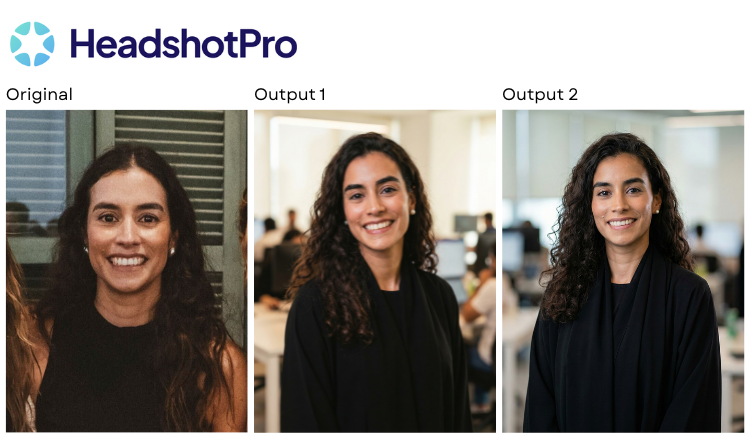
HeadshotPro is an AI headshot generator with tiered pricing and one of the larger output volumes among the platforms we tested. It accepts as few as one uploaded photo (though three are suggested), offers packages ranging from 32 to 128 headshots, and includes team pricing for organizations that need headshots at scale.
On paper, the lower entry price and flexible upload requirement are appealing. In practice, the experience is complicated by one of the strictest photo approval processes we encountered, and output quality that doesn’t always justify the time investment.
Key Features
- Tiered pricing from $29 to $59 for individuals, with team pricing starting at $39 per person
- Under 2-hour turnaround
- Customization options for format (portrait or landscape), background, and outfit
- 1-photo minimum upload (3 suggested)
- 32 to 128 headshots delivered depending on plan
Advantages
- The starting price of $29 is one of the lower entry points among paid AI headshot generators, which makes it accessible if you’re testing the waters or working with a limited budget.
- HeadshotPro technically requires only one photo to get started, which is a lower barrier than the 10 photos InstaHeadshots requires or the 6 to 15 many other platforms demand.
- Team pricing with scaling discounts makes it a workable option for companies that need headshots for multiple employees.
- The range of output volume is generous. Even the smallest package delivers 32 headshots, and the top tier goes up to 128.
Shortcomings
- HeadshotPro had one of the strictest photo approval processes we tested. It rejected all of the first 10 images we submitted. While a high standard for input photos can theoretically improve output quality, having to disable the feature just to move forward undermines that premise and adds significant friction, especially for teams.
- When we turned off the strict approval to proceed, the results showed excessive facial variance. Some outputs looked like a different person entirely, which defeats the purpose of a professional headshot.
- Backgrounds were a recurring weak point. Many outputs included unrealistic or generic backdrops, and some inexplicably featured visible photo lights, which undercuts the “professional studio” look the platform promises.
- The detail level across outputs was average. The subject generally looked decent, but the overall package of subject plus background plus lighting didn’t consistently come together in a way that felt polished or believable.
- The turnaround time of up to two hours is significantly slower than faster alternatives, which matters if you’re on a deadline.
Headshots.com Overview
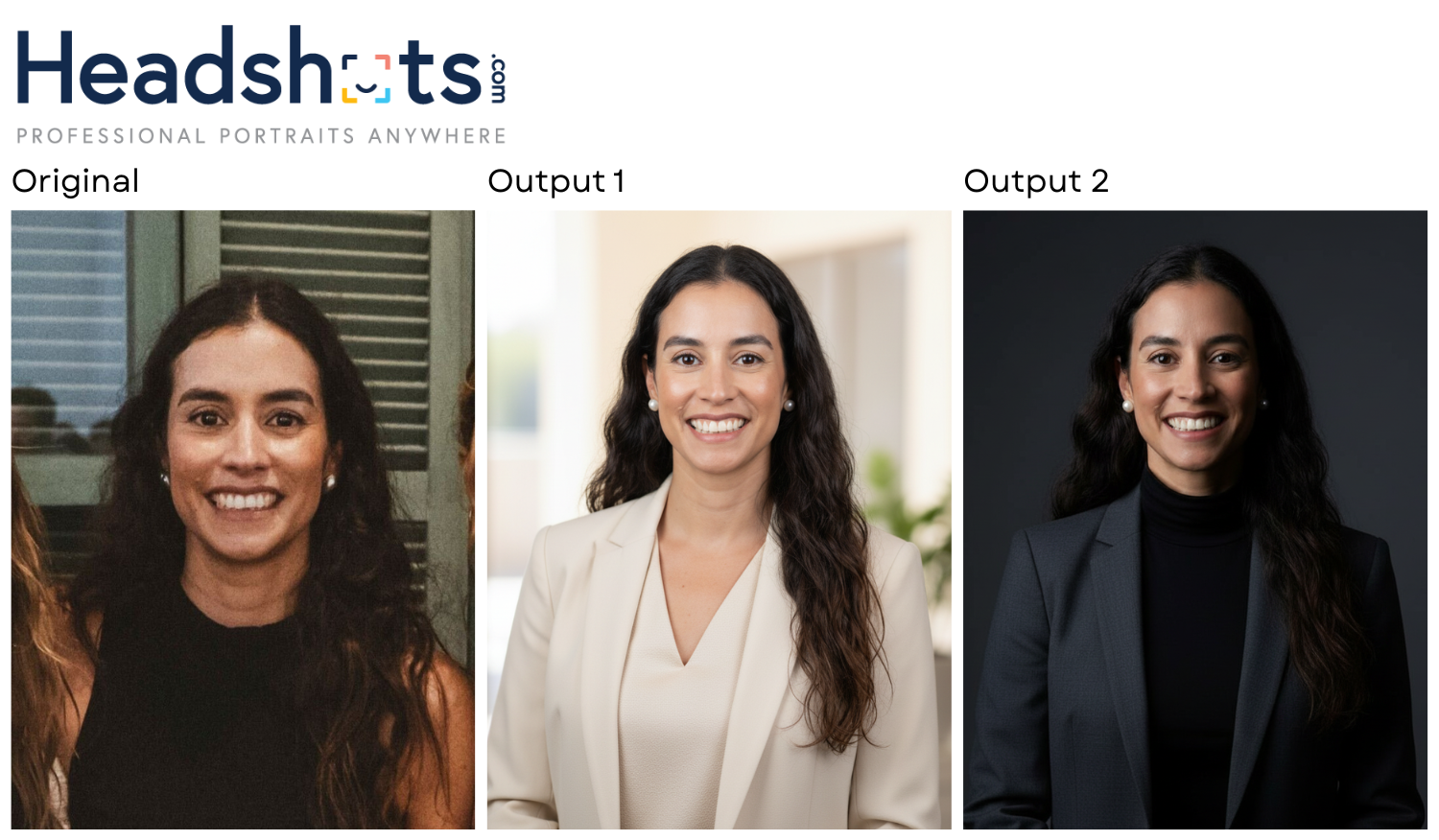
Headshots.com started as a digital headshot service run by a photographer with 17-plus years behind the camera. That real-world headshot experience now sits at the core of the platform’s AI technology, which is engineered around one thing above all else: making sure the output actually looks like you.
Where most AI headshot tools ask you to upload a stack of photos, pay upfront, and wait to see whether the results are usable, Headshots.com flips that model. A single photo is all you need. Results appear in about 30 seconds. And you don’t pay a cent until you see something worth keeping.
The platform has served more than 4,000 brands — Toyota, JPMorgan, Voya, and T-Mobile among them — and built a reputation for delivering consistent, authentic headshots whether the order is for one person or an entire department. Here’s what sets it apart:
1. A single photo. Results in seconds.
Other generators in this comparison require up to 10 uploads and turnaround windows measured in minutes or hours. Headshots.com works from one photo and returns results in roughly 30 seconds.
That near-instant feedback changes the experience entirely. You know what you’re working with almost immediately, and you’re never committed to a package before you’ve seen the quality.
2. No upfront payment
Unlike every other platform in this comparison, Headshots.com doesn’t charge you before generation. Browse the results for free, then pay $15 per image — only for the headshots you actually want. That removes the sunk-cost dynamic that makes $29 to $59 prepaid packages feel like a gamble.
3. The most realistic output we tested
Across all the generators we evaluated, Headshots.com delivered the highest level of realism. Outputs preserved the subject’s actual facial features, avoided the over-smoothed AI aesthetic, and maintained natural-looking expressions. The result reads like a professionally lit photograph, not a synthetic rendering.
4. Post-generation Refinement Studio
Once your headshots are generated, the Refinement Studio lets you dial in outfit color, accessories, posture, expression, background, lighting, and overall color tone. That post-generation control means the first pass isn’t the final word. You can adjust until the image matches the exact context you need — LinkedIn, a team page, a conference bio, or a personal site.
5. Enterprise-tested at scale
A client roster that spans Fortune 500 companies and thousands of brands gives Headshots.com a depth of track record that newer AI headshot startups haven’t had time to build. The platform is designed to handle individual orders and large team rollouts with equal consistency.
Comparing InstaHeadshots, HeadshotPro, and Headshots.com Head-to-Head
Each of these platforms markets itself as a professional AI headshot solution, but the experience and results differ significantly. Here’s how they stack up across the categories that matter most.
Pricing Model
| InstaHeadshots | $59 flat fee, single package, pay before you see results |
| HeadshotPro | $29–$59 individual, $39+/person for teams, pay before you see results |
| Headshots.com | $15 per image, no upfront cost. Generate first, pay only for what you keep. |
Photos Required to Upload
| InstaHeadshots | 10 |
| HeadshotPro | 1 minimum (3 suggested) |
| Headshots.com | 1 |
Turnaround Time
| InstaHeadshots | ~15 minutes |
| HeadshotPro | Up to 2 hours |
| Headshots.com | ~30 seconds |
Number of Headshots Delivered
| InstaHeadshots | 50 |
| HeadshotPro | 32–128 |
| Headshots.com | 30 |
Image Quality and Realism
| InstaHeadshots | Average overall; recurring eye issues (unnatural color, misalignment) undermine otherwise decent lighting and backgrounds |
| HeadshotPro | Average detail with decent subjects but unrealistic backgrounds; strict photo approval or excessive facial variance; sometimes looks like a different person |
| Headshots.com | Highest of any platform tested; realistic facial features, natural expressions, no over-processed AI aesthetic |
Customization Options
| InstaHeadshots | Preset “looks” (bundled background + outfit) with no independent control |
| HeadshotPro | Format (portrait/landscape), background, outfit |
| Headshots.com | Post-generation Refinement Studio: outfit color, accessories, posture/position, expression, background, lighting, color |
Money-Back Guarantee
| InstaHeadshots | Yes, with strict criteria (3-day window) |
| HeadshotPro | Yes |
| Headshots.com | Yes, plus the pay-per-photo structure means there’s no risk of paying for images you don’t want |
Best For
| InstaHeadshots | Users who prioritize speed and simplicity over customization and are fine paying upfront for a bulk batch |
| HeadshotPro | Users who want a lower entry price and more output volume, and are willing to navigate a strict approval process or accept facial variance |
| Headshots.com | Professionals and teams who want authentic-looking results, granular post-generation editing, and a model where they only pay for what they use |
Which AI Headshot Generator Should You Choose?
Choose InstaHeadshots if speed and simplicity are your top priorities. The 15-minute turnaround and zero-decisions workflow make it easy to use, and 50 headshots gives you a reasonable pool to pull from. The downsides are real, though: recurring eye issues across outputs, no meaningful customization, and a $59 flat price with no budget-friendly alternative. It’s a volume play, not a quality play.
Choose HeadshotPro if you’re looking for a lower price floor and want the option of a larger output batch. Starting at $29 with packages up to 128 headshots, it gives you more pricing flexibility than InstaHeadshots, and team plans make it viable for organizations. The catch is a photo approval process strict enough to stall your entire workflow, and output quality that suffers when you bypass it. Backgrounds were consistently unrealistic, and some headshots looked like someone else entirely. There are usable images in the batch, but finding them takes patience.
Choose Headshots.com if what matters most is getting a headshot that actually looks like you. One photo, 30-second results, and a pay-per-image model mean you’re never paying before you see the quality, and never paying for images you won’t use. The Refinement Studio adds a layer of post-generation control that neither InstaHeadshots nor HeadshotPro can match. In our testing, the output was the most realistic and consistent of any platform we evaluated.
Whether you’re updating your LinkedIn, onboarding with a new company, or refreshing headshots across a team, the goal is the same. You want a professional image that looks like the real you. Try Headshots.com’s AI headshots to see the difference for yourself.
Buying for a team? Start a free team trial and see your team’s results before you pay.